
Download AppLock Theme Aurora APK – Free Android App, Video, Secure, Latest Version
Overview
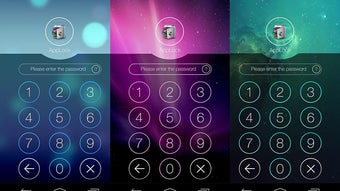
AppLock Theme Aurora is a free Android application developed by DoMobile Lab, designed to enhance the visual experience and security of app usage on mobile devices. Positioned within the 'Video' category, the app functions as a theme pack that integrates with the AppLock application, offering users a distinctive aesthetic and improved interface for managing protected apps. While its primary role is thematic customization, it contributes to a more immersive and personalized user environment.
The software targets Android users who value both privacy and visual appeal in their device management tools. Ideal for individuals seeking to personalize their app-locking experience with a modern, sleek design, AppLock Theme Aurora caters to users who want a cohesive look across their security and media apps. Real-world usage scenarios include customizing the appearance of the AppLock interface when accessing locked applications, enhancing the overall user experience during daily device interactions.
The app was released on September 9th, 2023, and is compatible with Android 13.0 and above, ensuring it meets current system requirements for newer devices.
Key Features & Capabilities
- Thematic Customization: Provides a visually appealing theme for the AppLock interface, featuring a modern, Aurora-inspired design with dynamic color gradients and smooth transitions.
- Enhanced Visual Experience: Improves the look and feel of the app-locking process by introducing a unique visual identity that stands out from default themes.
- Integration with AppLock: Designed to work seamlessly with the AppLock application, allowing users to apply the theme without requiring additional setup steps.
- Free Access: Available at no cost, enabling users to experiment with the theme without financial commitment.
- Regular Updates: The app receives periodic updates, with the latest version being 1.1.2, indicating ongoing support and development.
Users can apply the theme to personalize the appearance of their app-locking interface, making the process of accessing protected apps more engaging and visually satisfying. This is particularly useful for individuals who frequently use app locks and wish to maintain a consistent, modern aesthetic across their device’s security features. The theme’s design elements are optimized for readability and ease of navigation, ensuring that functionality is not compromised by style. Since it operates as a theme pack, it does not introduce new locking mechanisms or security protocols, but rather enhances the presentation layer of an existing security tool.
User Interface, Workflow & Performance
The user interface of AppLock Theme Aurora is designed to align with the AppLock application’s existing layout, ensuring a consistent and intuitive experience. Navigation is straightforward, with the theme applied directly through the AppLock settings, minimizing the need for complex user interaction. The workflow is streamlined, allowing users to activate the theme with minimal effort, typically involving a single tap within the app’s theme selection menu.
The visual elements—such as gradient backgrounds, icon styling, and animation effects—are rendered smoothly, contributing to a polished feel. However, exact performance details were not specified by the developer, including CPU or RAM usage during operation. General software behavior patterns suggest that the theme operates efficiently without significant impact on device performance, as it does not execute heavy background processes.
Stability appears to be maintained through regular updates, with version 1.1.2 indicating active maintenance. The developer did not provide additional system requirements or performance benchmarks.
Compatibility & System Requirements
AppLock Theme Aurora is designed for Android 13.0 and above, ensuring compatibility with recent Android devices. The application is distributed as an APK file, allowing installation on Android smartphones and tablets without requiring a Google Play Store account. The current version is 1.1.2, and the installation size is not specified in the provided information.
The developer did not list exact hardware requirements, such as minimum RAM or processor specifications. Compatibility information is limited to the operating system version, meaning users with older Android versions may not be able to install or use the app. The absence of detailed system requirements suggests that the app is lightweight and likely optimized for modern devices, but this cannot be confirmed without further technical data.
Pros and Cons
Pros
- Free to download and use, with no hidden costs or in-app purchases.
- Offers a visually appealing, modern theme that enhances the AppLock interface.
- Seamlessly integrates with the AppLock application, requiring minimal setup.
- Regular updates ensure ongoing compatibility and support.
- Designed for Android 13.0 and above, aligning with current device standards.
Cons
- Requires the AppLock application to function, limiting standalone use.
- Not compatible with Android versions below 13.0.
- Installation via APK may raise security concerns for users unfamiliar with sideloading.
- Exact performance and resource usage details were not provided.
- Functionality is limited to visual customization, with no additional features or security enhancements.
FAQ Section
Is AppLock Theme Aurora safe to download and install?
The app is published by DoMobile Lab, a known developer in the Android security and utility space. While the app is free and available via APK, users should ensure they download it from trusted sources to avoid potential risks associated with sideloading.
Can I use AppLock Theme Aurora without installing AppLock?
No. The theme is designed to work exclusively with the AppLock application. It cannot function independently and requires AppLock to be installed and configured on the device.
Does AppLock Theme Aurora improve app security?
No. The app does not introduce new security features or strengthen existing ones. It only enhances the visual appearance of the AppLock interface.
How often are updates released for AppLock Theme Aurora?
The app has been updated to version 1.1.2, indicating regular maintenance. However, the frequency of updates is not specified beyond this information.
Can I use AppLock Theme Aurora offline?
Yes. Once installed, the theme can be used offline. No internet connection is required to access or apply the theme after initial setup.
Final Thoughts
AppLock Theme Aurora offers a clean, modern aesthetic that elevates the user experience of the AppLock application. While it does not expand functionality or security, its visual enhancements provide a satisfying customization option for users who prioritize design in their mobile tools. The free availability, seamless integration, and compatibility with modern Android devices make it a worthwhile addition for those already using AppLock.
However, users with older Android versions or those seeking standalone security tools may find it unsuitable. For individuals who value both privacy and visual polish, AppLock Theme Aurora delivers a focused, effective solution. Download AppLock Theme Aurora now.





.png)

